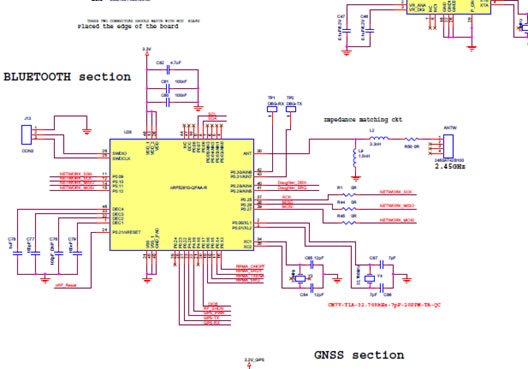
Every groundbreaking electronic device, from the simplest IoT sensor to the most complex AI accelerator, begins not with a physical component, but with an idea. That idea then translates into a visual blueprint: the circuit diagram. But bridging the gap from a conceptual circuit diagram to a tangible, manufacturable Printed Circuit Board (PCB) requires more than just drawing lines. It demands specialized Schematic Capture Software & Tools—the indispensable first step in turning your vision into a functional, physical reality.
This isn't merely about digitizing a sketch; it's about embedding intelligence into your design from the very outset. Effective schematic capture takes your conceptual circuit, breathes life into its components, and lays the precise groundwork for an error-free, high-performance PCB. Without it, you're building a house on quicksand.
At a Glance: Your Guide to Schematic Capture Software
- The Blueprint: Schematic capture transforms abstract circuit ideas into intelligent, digital representations that are readable by machines and humans.
- The Foundation: It defines every component, its properties, and its interconnections, serving as the single source of truth for your PCB.
- The Integration Imperative: The best tools offer a unified environment, seamlessly linking schematic design to PCB layout, preventing costly errors and rework.
- Component Intelligence: Modern software provides access to vast, verified component libraries, ensuring accuracy and streamlining part selection.
- Synchronization is Key: Changes made in the schematic must instantly reflect in the PCB layout, maintaining design integrity throughout the process.
- Manufacturing Ready: A well-executed schematic capture ensures your design is correctly translated into manufacturing data, avoiding production snags.
The Genesis of Electronics: Why Schematics are More Than Just Pictures
Before any solder flows or copper traces are etched, there's the schematic. Think of it as the architect's blueprint for a building, the composer's score for an orchestra, or a detailed anatomical diagram for a surgeon. It's the universal language of electronics, detailing every component, its precise interconnections, and how power and ground are distributed across the system.
A circuit diagram isn't just a static image; it's a dynamic representation of your circuit's intended electrical behavior. It tells the story of how current flows, how signals propagate, and how each part contributes to the overall function. This foundational document ensures that everyone involved in the design and manufacturing process—from the engineer to the fabricator—is speaking the same language.
Historically, these diagrams were drawn by hand, a laborious process fraught with potential for human error. Any change meant redrawing, any mistake could be propagated silently through the design process, leading to expensive rework or complete product failure. This is where the power of digital schematic drawing and schematic capture comes into play, transforming a static drawing into an intelligent, interconnected dataset. To dive deeper into the basics of circuit diagrams, you might want to Explore the schematic overview.
Enter Schematic Capture Software: Bridging the Conceptual and the Physical
Schematic capture software takes the abstract lines and symbols of a circuit diagram and translates them into a highly organized, machine-readable dataset. It's the critical juncture where your intellectual property—your circuit's design—gets formalized for the journey to a physical PCB.
At its core, schematic capture achieves a few vital things:
- Component Intelligence: It assigns real-world properties to your schematic symbols. Each resistor, capacitor, IC, or connector isn't just a symbol; it's linked to specific part numbers, electrical parameters, and most crucially, its physical footprint. This footprint dictates how the component will physically sit on the PCB.
- Netlist Creation: It defines every electrical connection (or "net") in your circuit. This netlist is a comprehensive list of all components and their pin-to-pin connections, forming the backbone of your PCB layout.
- Error Prevention: By digitizing and formalizing the design, the software can run automated checks, identifying potential electrical errors, unconnected pins, or mislabeled nets before they ever make it to the physical board.
Crucially, an effective schematic diagram maker shouldn't just draw; it should integrate component and footprint data directly into a preliminary layout. This means a seamless transition from your schematic sheets to an initial PCB layout without the hassle of converting files between multiple, disconnected programs. This integrated approach, epitomized by solutions like Altium Designer, is what prevents incompatibility issues and streamlines the entire design flow.
The Power of a Unified Design Environment
Many designers initially gravitate towards separate free software for schematic drawing and PCB layout. While this might seem cost-effective upfront, it often leads to a fragmented workflow. Data conversion, manual updates, and the constant risk of synchronization errors become a significant drain on time and resources.
This is why a unified platform is a game-changer. Imagine having your schematic drawing, schematic capture, and PCB layout tools all living harmoniously under one roof. This integrated solution provides a complete set of design features without paywalls hindering your progress and inherently prepares your designs for manufacturing by maintaining data integrity from start to finish. Altium Designer, for example, is built precisely on this philosophy, ensuring your electrical circuit diagrams are quickly captured as initial layouts, accurately mapping connections and displaying component footprints in a single, cohesive CAD document.
What Makes Great Schematic Capture Software? Key Features You Need
Choosing the right schematic capture software isn't just about finding a tool that draws lines; it's about selecting a robust platform that empowers your design process. Here are the essential features to look for:
Intuitive Drawing and Editing Tools
The software should make it easy to translate your circuit ideas into digital schematic sheets. This includes:
- Vast Symbol Libraries: Access to a wide range of standard and specialized component symbols (resistors, capacitors, transistors, microcontrollers, connectors, etc.).
- Smart Wiring Tools: Features that snap to pins, automatically route wires, and manage net labels efficiently.
- Hierarchical Design Support: For complex designs, the ability to break down your circuit into smaller, manageable blocks (sheets) and connect them hierarchically. This approach keeps your schematic organized and readable, even when dealing with thousands of components. Altium Designer specifically supports hierarchical schematic design for superior organization.
- Customization: The flexibility to create and modify your own symbols to represent unique or proprietary components.
Robust Component Libraries and Data Management
This is arguably the most critical feature. The quality and accessibility of your component libraries directly impact the accuracy and efficiency of your design.
- Verified Symbols and Models: Ensuring that the schematic symbols accurately represent the electrical behavior and that associated PCB footprints are correct. Bad footprints lead to bad boards.
- Integrated Part Search: Tools that allow you to quickly find and place verified parts from reputable manufacturers directly into your schematics. Altium Designer, for instance, includes a Manufacturer Part Search panel that streamlines this process, linking directly to supply chain data.
- Custom Library Creation: The ability to build and manage your own libraries for unique or frequently used components, complete with symbols, footprints, and 3D models.
- Data Integrity: A well-structured component library helps prevent data errors in PCB layout, ensuring consistency and accuracy across all your projects.
Intelligent Design Rule Checking (DRC)
Catching errors early saves immense time and money. DRC in schematic capture software automatically checks your design against a set of predefined electrical and connectivity rules.
- Connectivity Checks: Ensuring all pins are connected as intended, identifying open nets or short circuits.
- Electrical Rule Checks (ERC): Warning about potential electrical issues, such as power pins connected to ground, nets with multiple drivers, or insufficient power/ground connections.
- Custom Rules: The ability to define your own rules based on specific design requirements or company standards.
Seamless Integration with PCB Layout
The transition from schematic to PCB layout must be flawless. This is where "schematic capture" truly shines, converting your logical design into a physical board structure.
- Instant Layout Translation: The ability to instantly translate your schematic into a blank PCB layout, complete with component footprints and net connections.
- Bidirectional Synchronization: This is crucial. Any change made in the schematic (e.g., adding a component, changing a net name) must automatically update in the PCB layout, and vice versa. This "live" synchronization prevents inconsistencies that can lead to costly manufacturing errors. Altium Develop integrates schematic capture with schematic and PCB layout editors, ensuring consistent synchronization from circuit diagrams to PCB layout.
- Netlist Generation: The software should reliably generate a netlist—the blueprint for connections on your PCB—which is essential for fabrication.
Unified Design Environment
The pinnacle of schematic capture software is its role within a truly unified design environment. This means that schematic creation, PCB layout, simulation, analysis, and documentation tools are all part of a single software package.
- Streamlined Workflow: A rules-driven design engine ensures consistent device operation and enforces a smooth, consistent workflow from start to finish.
- Data Consistency: All design data is synchronized across different stages, reducing the risk of errors that often occur when moving between disparate tools.
- Collaboration: A unified environment fosters consistent communication between design teams, manufacturers, and the design tools themselves. Altium Develop is a prime example, consolidating design, verification, documentation, and management tools into one platform for maximum efficiency and production readiness.
The Workflow: From Concept to Capture and Beyond
Understanding the capabilities is one thing; seeing them in action is another. Here’s a typical workflow incorporating schematic capture software:
Step 1: Ideation and Initial Circuit Diagram
You start with an idea, a problem to solve, or a function to achieve. This often begins with sketching out your circuit concept on paper or in a simple diagram. This is the "what" and "how" on a conceptual level—the high-level block diagram and initial component choices.
Step 2: Schematic Drawing in Software
This is where schematic capture software takes over. You begin by placing component symbols from your libraries onto a blank schematic sheet. You then use the wiring tools to connect these symbols, defining the electrical paths. For complex designs, you might create multiple sheets and link them hierarchically, much like chapters in a book. This step involves:
- Placing Components: Dragging and dropping symbols like resistors, capacitors, integrated circuits (ICs), and connectors.
- Wiring: Drawing the connections between component pins. The software intelligently understands these as "nets."
- Net Labeling: Assigning descriptive names to critical nets (e.g., "VCC_3V3," "SPI_MOSI") for clarity and consistency.
- Power and Ground Connections: Explicitly defining your power rails and ground references.
Step 3: Component Selection and Parameter Assignment
As you place symbols, you're also defining their specific parameters. This involves:
- Part Number Assignment: Linking your generic symbols to specific manufacturer part numbers. This is where tools like Altium Designer's Manufacturer Part Search panel become invaluable, allowing you to select verified parts with confidence.
- Electrical Values: Assigning values like resistance (10kΩ), capacitance (100nF), voltage ratings, etc.
- Footprint Selection: Ensuring each component symbol is correctly associated with its physical PCB footprint, which dictates its size and pin arrangement on the board.
Step 4: Verification and Design Rule Checking (DRC)
Once your schematic is substantially complete, you run DRC. This automated process scours your design for any potential issues based on predefined rules. It checks for:
- Unconnected pins or nets.
- Nets with multiple power sources.
- Mismatched pin types (e.g., output connected to output).
- Floating inputs.
- Parameter consistency.
Addressing these warnings before moving to layout is crucial.
Step 5: The "Capture" Moment: Translating to PCB Layout
With a clean, verified schematic, you initiate the "schematic capture" process to generate the initial PCB layout. The software takes all the intelligence from your schematic—the components, their footprints, and the netlist—and creates a blank PCB document.
This document will show:
- Board Outline: Your predefined PCB shape.
- Components: All your components, typically placed outside the board outline or roughly within it.
- Ratsnests: These are thin lines representing the electrical connections (nets) that still need to be routed with copper traces on the PCB.
This step effectively "captures" the schematic's logic into a physical form, ready for component arrangement.
Step 6: Synchronization and Iteration
This is where the power of integrated tools truly shines. As you move into PCB layout (arranging components, routing traces), you'll inevitably need to make changes. Maybe you need to swap two pins on an IC for better routing, or perhaps you realize you forgot a decoupling capacitor.
With integrated schematic capture, changes in one domain are instantly reflected in the other. If you add a component to the schematic, it appears in the layout. If you change a net name in the layout, it updates in the schematic. This constant synchronization is vital for error-free, synchronized design data, ensuring that your schematic and layout always tell the same story. This capability is a cornerstone of effective PCB design software, preventing costly discrepancies.
Beyond the Basics: Advanced Capabilities for Serious Designers
While fundamental drawing and capture are essential, advanced schematic capture software offers features that elevate professional design workflows:
- Variant Management: The ability to create multiple versions (variants) of a product from a single schematic, such as different BOM options (e.g., populate/not populate a component) or cost-optimized versions. This allows designers to manage different product configurations efficiently.
- Multi-Channel Design: For repeating circuit blocks (e.g., multiple identical amplifier stages), multi-channel design allows you to draw one block and then instantiate it multiple times, significantly reducing drawing effort and improving consistency.
- Simulation Integration: Directly integrating schematic data with circuit simulation tools (SPICE, mixed-signal, etc.). This allows you to verify the electrical performance of your design virtually before committing to a physical prototype.
- Version Control: Integration with version control systems (like Git) or built-in versioning capabilities allows you to track changes, revert to previous states, and collaborate effectively with a team.
- Output Generation: Beyond the netlist, the software should effortlessly generate all necessary manufacturing and assembly documentation:
- Bill of Materials (BOM): A comprehensive list of all components, quantities, and supplier information.
- Pick and Place Files: Data for automated assembly machines.
- Gerber Files: The industry standard for PCB fabrication data.
- Assembly Drawings: Visual guides for manual assembly.
Choosing Your Tools: What to Look For
Selecting the right schematic capture software is a strategic decision that impacts your design efficiency, accuracy, and ultimately, your product's success.
1. Integration vs. Standalone
- Integrated (e.g., Altium Designer): A single platform handling schematic, layout, and often simulation/analysis.
- Pros: Seamless data flow, guaranteed synchronization, fewer compatibility issues, consolidated workflow, comprehensive feature sets without paywalls.
- Cons: Often a higher initial investment, steeper learning curve due to breadth of features.
- Standalone (with separate layout tools): Using one program for schematics and another for layout.
- Pros: Potentially lower individual software cost, easier to learn one specific tool.
- Cons: Data conversion headaches, increased risk of synchronization errors, fragmented workflow, can be more expensive in the long run with time lost.
Verdict: For professional, reliable PCB design, an integrated solution is almost always superior. It unifies the design, verification, documentation, and management tools, ensuring better communication and fewer errors.
2. Library Depth and Quality
- Does the software offer extensive, verified component libraries?
- Can you easily create and manage your own custom components with accurate symbols, footprints, and 3D models?
- Is there integration with supply chain databases to get real-time part availability and pricing?
3. Ease of Use and Learning Curve
- How intuitive is the user interface?
- Are there ample tutorials, documentation, and community support?
- While professional tools have a learning curve, they should offer a logical, consistent user experience.
4. Scalability for Project Complexity
- Can the software handle designs ranging from simple prototypes to complex, multi-board systems with thousands of components?
- Does it support hierarchical design, multi-channel layouts, and advanced routing features?
5. Cost and Licensing Models
- Understand the total cost of ownership: initial purchase, subscription fees, maintenance, and potential add-ons.
- Consider perpetual licenses vs. annual subscriptions.
6. Industry Standard and Community Support
- Is the software widely used in the industry? This translates to more resources, training, and a larger talent pool if you're building a team.
- A strong user community can be invaluable for troubleshooting and learning best practices.
Altium Designer, frequently mentioned in industry discussions, is a prime example of a comprehensive solution that excels in these areas, offering powerful routing capabilities and ensuring schematic and layout data synchronization within a unified platform. It's built on a rules-driven design engine to ensure device operation and enforce a consistent workflow, making it a robust choice for designers aiming for optimal PCB layouts.
Common Pitfalls to Avoid in Schematic Capture
Even with the best tools, missteps can derail a design. Be aware of these common pitfalls:
- Poor Library Management: Using unverified or incorrect symbols and footprints is a recipe for disaster. Always verify new components. A messy library leads to design errors and rework.
- Ignoring DRC Warnings: DRC is your safety net. Don't dismiss warnings without understanding their implications. A design that "passes" DRC might still have critical issues if warnings were ignored.
- Lack of Synchronization: If you're using separate tools and not meticulously keeping your schematic and layout in sync, you're inviting errors. One change in the schematic can cascade into multiple errors in the layout if not updated.
- Unclear Net Labeling: Ambiguous or inconsistent net names can cause confusion and errors, especially in complex designs or team environments. Be precise and consistent.
- Starting Layout Too Soon: Resist the urge to jump into routing before your schematic is thoroughly verified and stable. Changes in the schematic become exponentially more difficult and time-consuming to implement once layout has begun.
- Overlooking Hierarchical Design: For large projects, trying to cram everything onto one flat schematic sheet makes it unreadable and unmanageable. Embrace hierarchical design for clarity.
Your Next Steps: Mastering the Art of PCB Design
Mastering schematic capture software is more than just learning button clicks; it's about developing a methodical approach to design. By leveraging the power of integrated tools, you're not just drawing circuits; you're engineering a robust, error-free path from concept to manufacturing.
To truly master this essential skill:
- Practice Consistently: Start with simple circuits and gradually increase complexity.
- Explore Features: Dive deep into your chosen software's capabilities, especially its library management and DRC functions.
- Utilize Resources: Leverage tutorials, online communities, and formal training provided by software vendors.
- Embrace Best Practices: Adhere to industry standards for schematic readability, component placement, and net labeling.
- Understand the "Why": Don't just follow steps; understand why each step is important for design integrity and manufacturing success.
With the right Schematic Capture Software & Tools and a disciplined approach, you'll unify your design process, mitigate risks, and confidently bring your innovative electronic products to life, ready for optimal PCB layouts and beyond.