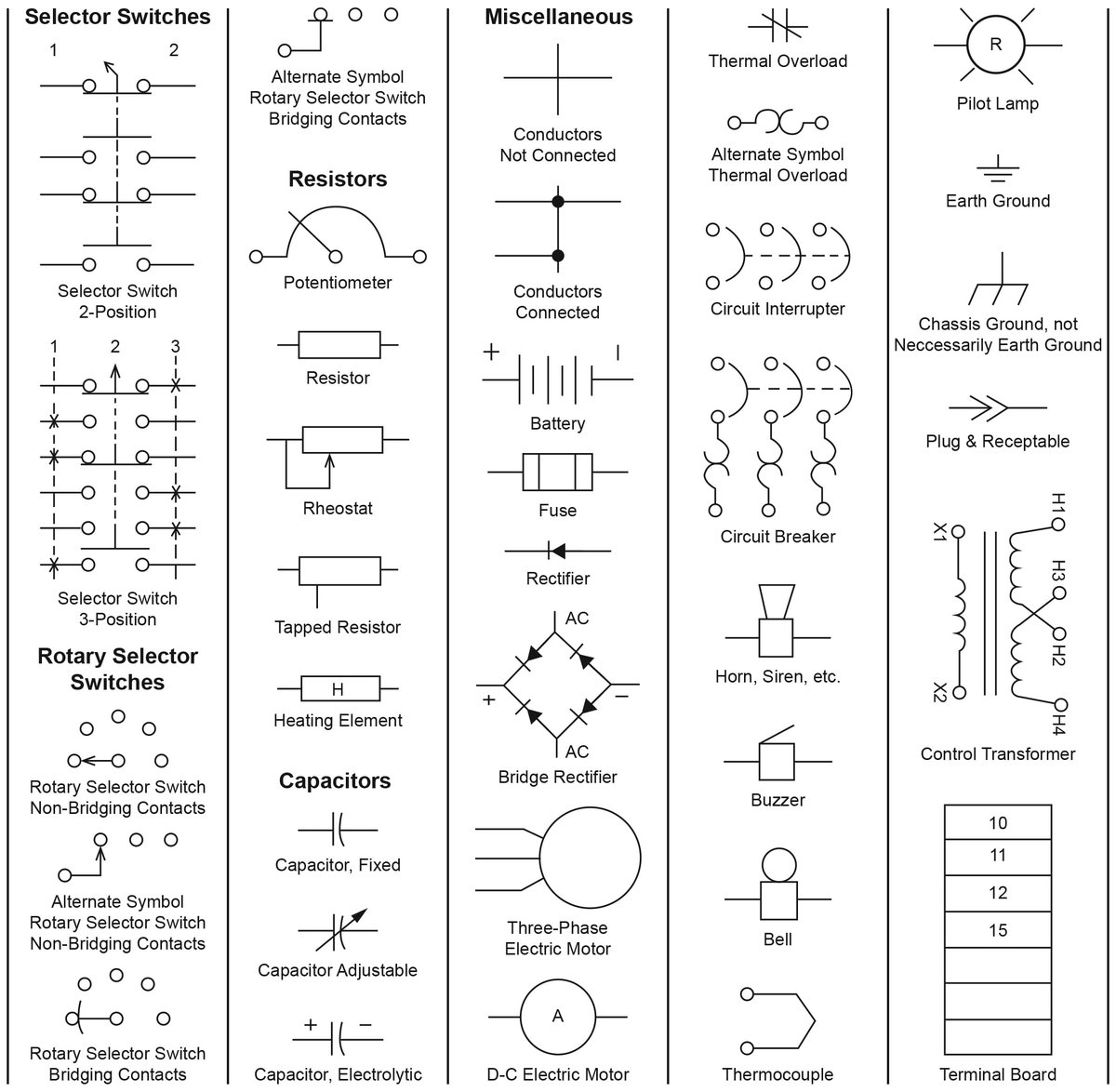
Ever gazed at a complex circuit diagram, feeling like you're trying to decipher an ancient hieroglyphic script? You're not alone. While the intricate lines and arcane squiggles might seem intimidating at first glance, they're actually a universal language. Mastering Standard Electronic Schematic Symbols is the fundamental skill that transforms those confusing diagrams into clear, actionable blueprints. It's how engineers, hobbyists, and technicians communicate precisely how an electronic circuit is built and how it operates, making it an indispensable skill for anyone diving into the world of electronics.
Imagine trying to build a house without understanding blueprints. Impossible, right? Similarly, circuit diagrams are the blueprints of electronics. Each symbol is a shorthand, representing a specific component, its function, and how it connects to the others. Get ready to unlock this powerful visual language and see circuits not as puzzles, but as elegant solutions waiting to be understood.
At a Glance: What You'll Learn
- The Foundation: Why schematic symbols are essential and the key standards governing them (like IEC and IEEE).
- The Basics: How to interpret lines for wires, connections, and non-connections.
- Powering Up: Recognizing symbols for various DC and AC power sources and crucial grounding types.
- Passive Players: Understanding resistors, capacitors, and inductors – the workhorses that shape electrical flow and store energy.
- Active Control: Demystifying switches, diodes, and transistors – the components that direct and amplify signals.
- Digital Logic: Grasping the fundamental gates that form the basis of all digital electronics.
- The Extras: Common symbols for measurement, input/output devices, and safety components.
- Practical Wisdom: Tips for reading schematics effectively, avoiding common mistakes, and accelerating your learning.
The Universal Dialect of Electronics: Why Symbols Matter
In electronics, ambiguity is the enemy. A single misinterpretation can lead to a non-functional device, or worse, a dangerous one. This is precisely why standard electronic schematic symbols are so vital. They provide a standardized, graphical language that transcends spoken language barriers, allowing an engineer in Tokyo to understand a circuit designed in New York, and vice-versa.
These symbols are more than just pictures; they're packed with information. A symbol tells you:
- What kind of component it is: Is it a resistor, a capacitor, or a transistor?
- Its fundamental purpose: Does it resist current, store charge, or amplify a signal?
- Its polarity or directionality: Does current only flow one way? Does it have a positive and negative terminal?
- Its variability: Can its value be adjusted?
While largely universal, it's worth noting that a few different standards exist, most notably those set by the International Electrotechnical Commission (IEC) and the Institute of Electrical and Electronics Engineers (IEEE, specifically IEEE Std 315). You might occasionally see slight variations, but the core principles and component identification remain remarkably consistent. Think of it like different accents in the same language – understandable, with minor distinctions.
Understanding these symbols is your first critical step to gain a schematic understanding of any electronic circuit you encounter.
Building Blocks: Wires & Connections
Every circuit begins and ends with connections. Wires are the circulatory system of an electronic circuit, carrying electrical signals and power between components. Knowing how to interpret these fundamental connections is paramount.
Wire Circuit Symbol
- Appearance: A simple, continuous line.
- Meaning: Represents a conductive path, typically a wire, connecting two or more points in the circuit. These lines are the "roads" that electricity travels on.
Wires Joined Circuit Symbol
- Appearance: Two or more lines intersecting with a prominent dot at the intersection.
- Meaning: This dot is crucial! It signifies that the wires are electrically connected or "shorted" together at that point. Think of it as a junction box where multiple wires are twisted and soldered.
Wires Not Joined Circuit Symbol
- Appearance: Two lines crossing over each other without a dot. Sometimes, a small "bridge" or "arch" symbol is used over one line to explicitly show it's crossing over the other without touching.
- Meaning: The lines cross visually on the diagram but are not electrically connected. One wire is passing over another without making contact. This helps keep diagrams tidy without implying unwanted connections.
Powering Your Projects: Supply & Grounding Symbols
No circuit works without power, and every circuit needs a common reference point. These symbols are among the most frequently seen and are essential for understanding where the energy comes from and where it finds its common return path.
Power Supply Symbols (The Energy Sources)
- Single Cell:
- Appearance: Two parallel lines, one longer and thinner (positive terminal) and one shorter and thicker (negative terminal).
- Meaning: Represents a single DC battery cell, providing a fixed direct current voltage (e.g., 0.5V DC, 1.5V DC).
- DC Battery Supply:
- Appearance: Multiple pairs of single cell symbols stacked in series. The positive of one cell connects to the negative of the next.
- Meaning: Indicates a collection of single cells forming a higher voltage DC battery supply (e.g., a 9V battery).
- DC Voltage Source:
- Appearance: A circle with a plus (+) and minus (-) sign inside, or sometimes just a circle with one long and one short line (like a battery, but often without multiple cells).
- Meaning: Represents a constant, fixed DC voltage supply.
- DC Current Source:
- Appearance: A circle with an arrow inside, indicating the direction of conventional current flow.
- Meaning: Represents a constant DC current supply of a fixed value, independent of the voltage across it.
- Controlled Voltage Source:
- Appearance: A diamond shape with a plus (+) and minus (-) inside, or with polarity markers.
- Meaning: A dependent voltage source whose output voltage is controlled by another voltage or current elsewhere in the circuit. Crucial for modeling active devices.
- Controlled Current Source:
- Appearance: A diamond shape with an arrow inside, indicating current direction.
- Meaning: A dependent current source whose output current is controlled by another voltage or current elsewhere in the circuit.
- AC Voltage Source (AC Supply):
- Appearance: A circle with a sinusoidal wave (~) inside.
- Meaning: Represents an alternating current (AC) voltage source or generator, like mains electricity, where the voltage continually changes direction.
Electrical Grounding Symbols (The Reference Points)
Ground symbols represent a common reference point in a circuit, usually considered 0 Volts.
- Earth Ground:
- Appearance: Three progressively shorter horizontal lines stacked vertically, with the longest at the top.
- Meaning: Connects the circuit to the actual physical earth, providing a safety path for fault currents and a universal zero potential reference.
- Chassis Ground:
- Appearance: A triangle, or several horizontal lines decreasing in length towards the bottom, connected to a thicker horizontal bar.
- Meaning: Connects to the metal enclosure (chassis) of the equipment. Often connected to the power supply's earthing pin, it provides a common reference within the device itself.
- Digital Ground:
- Appearance: A triangle pointing downwards (similar to chassis ground, but specifically for digital circuits) or multiple stacked triangles.
- Meaning: A common ground line for digital logic circuits, often kept separate from analog grounds to prevent noise interference.
- Ground (GND):
- Appearance: A simple inverted triangle, or three progressively shorter horizontal lines (like earth ground, but can be used more broadly).
- Meaning: A general term for a common return path for current, typically 0V of the power supply. The specific type (earth, chassis, digital) is often inferred from context or explicitly marked.
Shaping the Flow: Resistors & Their Cousins
Resistors are passive components fundamental to almost every circuit. They do exactly what their name implies: resist the flow of electric current. This resistance is used to limit current, divide voltage, and dissipate energy as heat.
- Fixed Resistor (IEEE/IEC Design):
- Appearance (IEEE): A zigzag line.
- Appearance (IEC): A simple rectangle.
- Meaning: A component with a fixed electrical resistance value, used to control current, create voltage drops, or bias transistors.
- Potentiometer (IEEE/IEC Design) (POT):
- Appearance: A fixed resistor symbol with an arrow pointing to the resistive element, signifying a third, adjustable terminal (the wiper).
- Meaning: A three-terminal variable resistor. The resistance between the two end terminals is fixed, but the resistance between an end terminal and the wiper can be adjusted from zero to the maximum value. Used for voltage control (e.g., volume control in audio).
- Rheostat (IEEE/IEC Design):
- Appearance: A fixed resistor symbol with an arrow pointing to the resistive element from one end (or across the whole element).
- Meaning: A two-terminal variable resistor primarily used to control current in a circuit. It allows you to adjust the total resistance from zero to a maximum value.
- Trimmer Resistor:
- Appearance: Similar to a potentiometer but often with an arrow intersecting at an angle or with a "T" shape.
- Meaning: A small variable resistor, typically found on Printed Circuit Boards (PCBs), adjusted infrequently with a screwdriver for fine-tuning a circuit's performance.
- Thermistor (IEEE/IEC Design) (TH):
- Appearance: A fixed resistor symbol with a line crossing through it at an angle, often with a 'T' or a curved line.
- Meaning: A thermal resistor whose resistance value changes significantly with temperature. Used as temperature sensors or for temperature compensation.
- Photoresistor (Light Dependent Resistor, LDR):
- Appearance: A fixed resistor symbol enclosed in a circle, with two arrows pointing inwards (representing light).
- Meaning: A variable resistor whose resistance value changes based on the intensity of light falling upon it. Brighter light means lower resistance. Used in light sensors and auto-dimming circuits.
Storing Energy & Filtering Signals: Capacitors
Capacitors are fascinating components that store electrical energy in an electric field. They are essential for filtering signals, blocking DC current while allowing AC to pass, and for timing applications. Think of them as tiny, fast-acting rechargeable batteries.
- Fixed Value Capacitor:
- Appearance: Two parallel lines or plates (often curved on one side in IEC, straight in IEEE).
- Meaning: A fixed value, non-polarized capacitor. This type can be connected in a circuit without concern for polarity. Used to store charge, filter noise, or couple AC signals.
- Polarized Capacitor:
- Appearance: One straight line (positive) and one curved line or a straight line with a plus (+) sign, and a straight line (negative).
- Meaning: A fixed value, polarized capacitor (e.g., electrolytic or tantalum). It must be connected with the correct polarity (positive to higher potential, negative to lower) to avoid damage or even explosion.
- Variable Capacitor:
- Appearance: A fixed capacitor symbol with an arrow passing through it at an angle.
- Meaning: An adjustable capacitor whose capacitance value can be varied, typically by physically adjusting the overlap of its plates. Commonly found in radio tuning circuits.
- Trimmer Capacitor:
- Appearance: Similar to a variable capacitor, often with a diagonal line through it, sometimes with an arrow pointing to one of the plates.
- Meaning: A small variable capacitor adjusted with a non-conductive tool (like a small screwdriver) for initial circuit calibration or fine-tuning, usually on a PCB.
Magnetic Magic: Inductors & Coils
Inductors, often called coils or chokes, are passive components that store energy in a magnetic field when current flows through them. They oppose changes in current, acting as "current stabilizers" and are crucial in filtering, tuning, and power conversion.
- Open Inductor:
- Appearance: A series of loops or semicircles (like a spring).
- Meaning: Represents a basic inductor, coil, or solenoid. When energized, it generates a magnetic field. Used in filters, oscillators, and RF circuits.
- Iron Core Inductor:
- Appearance: An inductor symbol with two solid parallel lines drawn above it.
- Meaning: An inductor wound around a solid laminated iron core. The iron core increases the inductor's magnetic field strength and inductance, making it suitable for lower frequency applications, power supplies, and audio circuits.
- Ferrite Core Inductor:
- Appearance: An inductor symbol with two dashed parallel lines drawn above it.
- Meaning: An inductor wound around a non-solid ferrite core. Ferrite cores are used for higher frequency applications because they reduce eddy current losses compared to iron. Commonly found in RF chokes and high-frequency transformers.
Controlling the Current: Switches & Contacts
Switches are the gatekeepers of a circuit, allowing you to turn power on/off or redirect the flow of current. They are fundamental for human interaction and automated control.
- SPST Toggle Switch (ON-OFF switch):
- Appearance: A simple lever arm pivoting to either make or break a single connection.
- Meaning: Single-Pole, Single-Throw. It has two terminals and simply opens or closes a single circuit path. It's either ON or OFF.
- SPDT Changeover Switch (ON-Off-ON):
- Appearance: A lever arm pivoting between a common terminal and two other terminals.
- Meaning: Single-Pole, Double-Throw. It has three terminals: a common one and two "throw" terminals. It connects the common terminal to one of the two throw terminals, allowing you to switch a single input between two outputs, or vice-versa.
- Pushbutton Switch (N.O):
- Appearance: Two contacts that are normally open, with an arrow pushing them together.
- Meaning: Normally Open (N.O.). The contacts are open by default, meaning no connection. When you push the button, the contacts close, making a connection. Releasing it opens them again. Used for momentary actions like a doorbell button.
- Pushbutton Switch (N.C):
- Appearance: Two contacts that are normally closed, with an arrow pushing them apart.
- Meaning: Normally Closed (N.C.). The contacts are closed by default, making a connection. When you push the button, the contacts open, breaking the connection. Releasing it closes them again. Used for emergency stop buttons or reset functions.
- Relay Contacts (SPST, SPDT, DPST, DPDT):
- Appearance: Similar to manual switch symbols, but often drawn with a broken line connecting them to a coil symbol (not always shown in every diagram).
- Meaning: Electromechanical relays use an electromagnet to open or close switch contacts. The symbols represent the contacts that are controlled by the relay coil.
- SPST: Single-pole, single-throw (one contact set, on/off).
- SPDT: Single-pole, double-throw (one contact set, switches between two positions).
- DPST: Double-pole, single-throw (two independent SPST contact sets, often ganged together).
- DPDT: Double-pole, double-throw (two independent SPDT contact sets).
- DIP Switch Assembly:
- Appearance: A rectangle representing the package, with individual switch symbols inside.
- Meaning: Dual In-line Package (DIP) switches are multiple small ON/OFF toggle switches grouped into a single package, designed for mounting on a PCB. Used for setting configuration options in embedded systems.
The Semiconductor Revolution: Diodes & Transistors
These components are the heart of modern electronics, enabling rectification, amplification, and switching—the core functions of virtually all active circuits.
Semiconductor Diode Symbols (One-Way Valves for Current)
Diodes are like one-way valves for electric current, generally allowing it to flow in only one direction.
- Semiconductor Diode (Rectifier Diode/Silicon Diode):
- Appearance: A triangle pointing towards a bar. The triangle is the anode (positive), the bar is the cathode (negative).
- Meaning: A basic pn-junction diode. It allows current to flow easily from the anode to the cathode (forward bias) but blocks current flow in the opposite direction (reverse bias). Used for rectification (converting AC to DC) and protecting circuits from reverse polarity.
- Zener Diode (ZD):
- Appearance: A diode symbol with the bar replaced by a "Z" or "S" shape.
- Meaning: A special type of diode designed to operate reliably in its reverse breakdown region. When reverse biased above its Zener voltage, it maintains a fixed voltage across its terminals. Used for voltage regulation and limiting.
- Schottky Diode:
- Appearance: A diode symbol with the bar replaced by a bent "S" or "L" shape on each side.
- Meaning: A metal-semiconductor junction diode characterized by a very low forward voltage drop and fast switching speed. Ideal for high-speed switching applications and power rectification in low-voltage circuits.
- Light Emitting Diode (LED):
- Appearance: A standard diode symbol with two arrows pointing outwards, representing emitted light.
- Meaning: Converts electrical energy into light when forward biased. LEDs are highly efficient light sources used as indicators, in displays, and for illumination.
- Photodiode:
- Appearance: A standard diode symbol with two arrows pointing inwards, representing incident light.
- Meaning: A light-sensitive diode that converts incident light energy into a weak voltage or current. Used in light detection, optical communication, and solar cells.
Transistor Symbols (Amplifiers & Switches)
Transistors are the true workhorses of electronics, capable of amplifying weak signals or acting as electronic switches. They come in many forms, but the bipolar junction transistors (BJTs) and field-effect transistors (FETs) are the most common.
- NPN Bipolar Transistor:
- Appearance: A circle containing a base line, a collector line, and an emitter line with an arrow pointing out from the emitter.
- Meaning: Has a p-type base region between two n-type (emitter and collector) regions. A small current into the base controls a much larger current flow from collector to emitter. The arrow indicates the conventional current flow out of the emitter. Used as an amplifier or switch.
- PNP Bipolar Transistor:
- Appearance: A circle containing a base line, a collector line, and an emitter line with an arrow pointing into the emitter.
- Meaning: Has an n-type base region between two p-type (emitter and collector) regions. A small current out of the base controls a much larger current flow from emitter to collector. The arrow indicates the conventional current flow into the emitter. Also used as an amplifier or switch.
- Darlington Pair Transistor:
- Appearance: Two interconnected bipolar transistor symbols, often within a single outline.
- Meaning: A configuration of two bipolar transistors (NPN or PNP) connected in series to provide a very high current gain. The output current of the first transistor feeds into the base of the second. Ideal for applications requiring high current amplification, such as driving motors.
- N/P-JFET Transistor:
- Appearance: Three terminals (Gate, Drain, Source) with a line representing the channel. The arrow at the gate indicates the type.
- N-JFET: Arrow points in to the gate.
- P-JFET: Arrow points out from the gate.
- Meaning: Junction Field Effect Transistor. It uses a small voltage at its gate to control the current flow between its source and drain terminals. N-channel and P-channel types have opposite operating characteristics. Used in high-input impedance amplifiers.
- N/P-MOSFET Transistor:
- Appearance: Three or four terminals (Gate, Drain, Source, Body/Bulk). The gate is insulated from the channel.
- N-MOSFET: Often has an arrow pointing in to the channel.
- P-MOSFET: Often has an arrow pointing out from the channel.
- Meaning: Metal-Oxide Semiconductor Field Effect Transistor. Similar to JFETs, but the gate is electrically insulated from the channel, resulting in extremely high input impedance. Operable in depletion or enhancement mode. Widely used in digital logic (CMOS) and power switching applications.
- Phototransistor:
- Appearance: A transistor symbol (usually NPN) with two arrows pointing inwards towards the base, representing incident light.
- Meaning: A light-sensitive transistor where the base current is controlled by light intensity, affecting the current flow between the collector and emitter. Provides much higher light sensitivity than a photodiode due to its internal gain.
Light & Isolation: Photodevice Symbols
Photodevices leverage light for sensing, display, or creating electrical isolation, bridging the gap between optical and electrical domains.
- 7-segment Display:
- Appearance: A block with seven distinct segments, often represented by individual LEDs, typically forming a "figure 8."
- Meaning: An electronic display device for showing decimal numerals. Each segment is an individual LED that can be turned on or off to form different digits. Common cathode and common anode versions exist.
- Solar Cell:
- Appearance: A circle with two arrows pointing inwards (light) and two output terminals. Sometimes represented as a diode with inward arrows.
- Meaning: A P–N junction photovoltaic cell that converts incident light intensity directly into electrical energy (voltage and current). The building block of solar panels.
- Opto-isolator or Optocoupler:
- Appearance: A combination of an LED symbol and a phototransistor (or photodiode) symbol, enclosed in a dashed box, with no direct electrical connection between input and output.
- Meaning: Uses light (typically from an LED) to transmit signals between two electrically isolated parts of a circuit. This protects sensitive components from high voltages or noisy signals.
The Brains of the Operation: Digital Logic Gates
Digital logic gates are the fundamental building blocks of all digital electronics, from microcontrollers to supercomputers. They perform basic Boolean functions based on their inputs.
- NOT Gate (Inverter):
- Appearance: A triangle with a small circle (inversion bubble) at the output.
- Meaning: Performs logical NOT. Its output is HIGH (1) when its input is LOW (0), and LOW when its input is HIGH.
- AND Gate:
- Appearance: A "D" shape with multiple inputs and one output.
- Meaning: Performs logical AND. Its output is HIGH only when ALL of its inputs are HIGH. Otherwise, the output is LOW.
- NAND Gate (NOT + AND):
- Appearance: An AND gate symbol with an inversion bubble at the output.
- Meaning: Performs logical NAND (NOT-AND). Its output is LOW only when ALL of its inputs are HIGH. Otherwise, the output is HIGH.
- OR Gate:
- Appearance: A curved shape resembling a shield, with multiple inputs and one output.
- Meaning: Performs logical OR. Its output is HIGH when ANY (or all) of its inputs are HIGH. The output is LOW only when ALL inputs are LOW.
- NOR Gate (NOT + OR):
- Appearance: An OR gate symbol with an inversion bubble at the output.
- Meaning: Performs logical NOR (NOT-OR). Its output is LOW when ANY (or all) of its inputs are HIGH. Its output is HIGH only when ALL inputs are LOW.
- XOR Gate (Exclusive-OR):
- Appearance: An OR gate symbol with an additional curved line at the input.
- Meaning: Performs logical Exclusive-OR. Its output is HIGH when its two inputs are DIFFERENT. Its output is LOW when its two inputs are the SAME.
- XNOR Gate (Exclusive-NOR) (NOT + XOR):
- Appearance: An XOR gate symbol with an inversion bubble at the output.
- Meaning: Performs logical Exclusive-NOR (NOT-XOR). Its output is HIGH when its two inputs are the SAME. Its output is LOW when its two inputs are DIFFERENT.
- SR Flip-Flop (Set-Reset):
- Appearance: A rectangular block with inputs S (Set), R (Reset), and outputs Q, Q-not.
- Meaning: A basic bistable device capable of storing one bit of data. Set (S) makes Q=1, Reset (R) makes Q=0.
- JK Flip-Flop (Jack Kilby):
- Appearance: A rectangular block with inputs J, K, Clock, and outputs Q, Q-not.
- Meaning: A versatile flip-flop with J (Set) and K (Reset/Clear) inputs, along with a clock input. It has internal feedback and can toggle its output state.
- D-type Flip-Flop (Delay or Data):
- Appearance: A rectangular block with inputs D (Data), Clock, and outputs Q, Q-not.
- Meaning: A single-input flip-flop that captures the state of its Data (D) input at the moment of a clock edge and holds it until the next clock edge.
- Data Latch:
- Appearance: A rectangular block with inputs D (Data), EN (Enable), and outputs Q, Q-not.
Meaning: Similar to a flip-flop, but it stores one data bit when its enable (EN) pin is LOW, and acts transparently (output follows input) when EN is HIGH. - 4-to-1 Multiplexer:
- Appearance: A trapezoidal shape with multiple data inputs, select inputs, and a single output.
- Meaning: A device that passes data from one of its multiple input pins (e.g., 4 inputs) to a single output line, based on the state of its select input(s). It's like an electronic switch for data.
- 1-to-4 Demultiplexer:
- Appearance: A trapezoidal shape, but with a single input, select inputs, and multiple outputs.
- Meaning: The opposite of a multiplexer. It takes data from a single input pin and directs it to one of several output lines, based on the state of its select input(s).
Measurement & Miscellaneous Essentials
Beyond the core components, a host of other symbols represent crucial elements for safety, input/output, and testing.
- Fuse (F):
- Appearance: A rectangular box with a zigzag or curved line inside (IEEE) or a simple square with a line through it (IEC).
- Meaning: A safety device containing a thin wire that melts and breaks the circuit if the current exceeds a specified value, protecting other components from damage due to overcurrent.
- Transformer (T):
- Appearance: Two inductor symbols placed next to each other, separated by lines representing the core (solid for iron, dashed for ferrite).
- Meaning: Electromagnetically couples two or more coils (primary and secondary windings) to step-up or step-down AC voltages. It does not transfer steady DC current. Essential in power supplies.
- Speaker:
- Appearance: A circle with diverging lines representing sound waves, or a bell-like shape.
- Meaning: Converts fluctuating electrical current into sound waves, producing a wide range of audio frequencies. Used for audio output.
- PiezoTransducer:
- Appearance: A rectangle with two terminals and two triangles facing each other.
- Meaning: Converts electrical energy into tone sound or vice versa, based on the piezoelectric effect. Often used for simple beeps or alarms.
- Buzzer:
- Appearance: A semicircle with diverging lines, sometimes with a plus sign for polarity.
- Meaning: An electromechanical or electronic device that produces a loud, often single-tone, buzzing sound (e.g., ~1500 Hertz).
- Microphone (MIC):
- Appearance: A circle with diverging lines representing sound waves pointing into it, sometimes with a 'MIC' label.
- Meaning: Converts sound energy into electrical energy (audio signals).
- XTAL Crystals:
- Appearance: A rectangle with two diagonal lines inside, connected to two terminals.
- Meaning: Crystal oscillators leverage the mechanical resonance of a piezoelectric crystal (usually quartz) to produce a very precise and stable frequency output. Critical for timing in microcontrollers and radio frequency circuits.
- Voltmeter:
- Appearance: A circle with the letter 'V' inside.
- Meaning: Measures voltage (potential difference) across two points in a circuit. It is always connected in parallel with the component or section being measured.
- Ammeter:
- Appearance: A circle with the letter 'A' inside.
- Meaning: Measures current passing through a circuit. It is always connected in series with the path where current is to be measured.
- Galvanometer:
- Appearance: A circle with the letter 'G' inside.
- Meaning: A highly sensitive meter used for detecting and measuring tiny electric currents, often in the microampere or milliampere range.
- Ohmmeter:
- Appearance: A circle with the Greek letter Omega (Ω) inside.
- Meaning: Measures the electrical resistance of devices or circuits. It must be used with the power off to the circuit being tested.
- Lamp Indicator or Light Bulb (Globe):
- Appearance: A circle with a cross inside, or an arc above an "M" shape (for incandescent).
- Meaning: Converts electrical energy into visible light. Often used as warning lights, indicators, or for general illumination.
- Motor (M):
- Appearance: A circle with the letter 'M' inside.
- Meaning: Converts electrical energy into mechanical energy (motion). Can also function as a generator when spun mechanically.
Decoding the Blueprint: Practical Tips for Reading Schematics
Understanding individual symbols is half the battle; the other half is interpreting them in context. Here’s how to approach a schematic like a pro:
- Start with the Power: Always locate the power supply (DC battery, AC source) and ground symbols first. This tells you where energy enters and exits, and establishes your voltage reference.
- Follow the Current Path: Imagine current flowing from the positive terminal of the supply, through components, and back to ground. This mental exercise helps you trace circuit operation.
- Identify Sub-circuits: Complex schematics are often broken down into smaller, manageable blocks (e.g., a power supply section, an amplifier section, a digital logic section). Look for these logical groupings.
- Pay Attention to Labels and Values: Symbols are often accompanied by alphanumeric designators (e.g., R1, C5, Q3) and component values (e.g., 10kΩ, 100nF, 5V). These are crucial for building or troubleshooting the circuit.
- Understand Connection Dots: Remember: a dot means a connection. No dot where lines cross means no connection. This is a common point of confusion for beginners.
- Look for Arrows: Arrows within symbols (diodes, transistors, current sources) indicate the direction of conventional current flow or the direction of an input/output. Arrows across components (potentiometer, variable capacitor) indicate adjustability.
- Recognize Common Patterns: Over time, you'll start to recognize recurring circuit patterns (e.g., voltage dividers, filter circuits, basic amplifier stages). This speeds up comprehension. For example, common patterns can help you understand how to choose fuel for a generator, if that's part of a larger power system.
- Consult Datasheets: If you encounter a less common or specialized integrated circuit (IC) symbol, its datasheet will provide pinout diagrams and internal block diagrams that clarify its function.
- Practice, Practice, Practice: The more schematics you read, the more intuitive the language becomes. Start with simple circuits and gradually work your way up to more complex ones. Consider trying to connect three generators in a virtual or theoretical exercise once you're comfortable.
Common Questions & Misconceptions
Learning a new language always brings questions. Here are a few common ones about schematic symbols:
"Why are there different standards (IEEE vs. IEC)?"
Historically, different regions and engineering bodies developed their own conventions. The IEEE (American) and IEC (European/International) standards are the most prevalent. While they largely agree, minor differences exist (like the resistor symbol or capacitor plate shape). In practice, most diagrams use a blend or lean heavily on one, and context usually makes it clear. It's rarely a major barrier to understanding. Think of it like driving on the right versus driving on the left – once you know which system you're in, you adapt.
"How do I know the polarity of an LED or a polarized capacitor?"
For LEDs, the longer lead is typically the anode (+), and the shorter lead is the cathode (-). On the symbol, the flat bar is the cathode. For polarized capacitors (like electrolytics), the negative terminal is often marked with a stripe or a minus sign on the component itself, and it corresponds to the straight bar (or the shorter line) on the symbol, with the curved line or longer line being the positive terminal. Always double-check! Reverse polarity can destroy these components.
"What do letters like 'R', 'C', 'Q', 'U' mean next to symbols?"
These are component designators or reference designators:
- R: Resistor
- C: Capacitor
- L: Inductor
- D: Diode
- Q: Transistor (BJT or FET)
- U: Integrated Circuit (IC) or chip
- J: Connector/Jack
- P: Plug
- SW: Switch
- F: Fuse
- T: Transformer
These letters help uniquely identify each component in a complex circuit diagram and link it to a bill of materials (BOM). They're especially important when you're looking to analyze damaged generator components or other electronic systems, helping you quickly pinpoint the part in question.
"Is 'ground' always 0V?"
In most cases, yes, ground is considered the common reference point and is assigned 0V. However, it's crucial to remember that "ground" is a relative term. In some circuits, you might have multiple "grounds" (e.g., analog ground, digital ground, chassis ground) that are intended to be at the same potential but are physically separated to prevent noise. Always refer to the circuit's specific grounding scheme.
Your Journey from Observer to Architect
Mastering standard electronic schematic symbols isn't just about memorizing shapes; it's about gaining fluency in the universal language of electronics. It empowers you to understand, troubleshoot, design, and innovate. From a simple LED circuit to a complex microprocessor, the underlying principles of communication through symbols remain the same.
The next time you see a schematic, approach it with confidence. Start by identifying the power, trace the connections, and then delve into the roles of each component. With practice, those once-mysterious lines and squiggles will transform into a clear, concise narrative of electrical intent.
So, grab a schematic, whether it's for a simple blinking light or a more complex 3-phase generator wiring diagram, and start practicing. The more you engage with them, the more natural and intuitive this powerful language will become. Your journey from simply observing electronics to truly understanding—and eventually creating—them begins here.